Tampilkan postingan dengan label Apple mobile repair and Jailbreak. Tampilkan semua postingan

Kamis, 20 Januari 2011

iPhone Wifi not working

Do you have an iPhone Wifi not working? This solution is for you!


Brief History: A customer ask for a repair of iPhone Wifi not working.
She only replace the cover with a white casing in a repair shop.


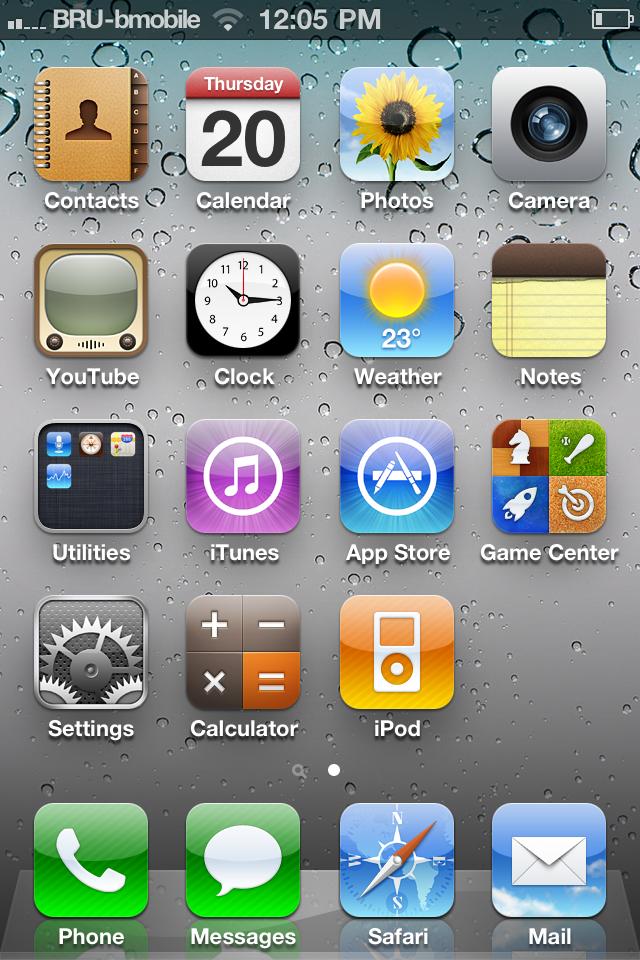
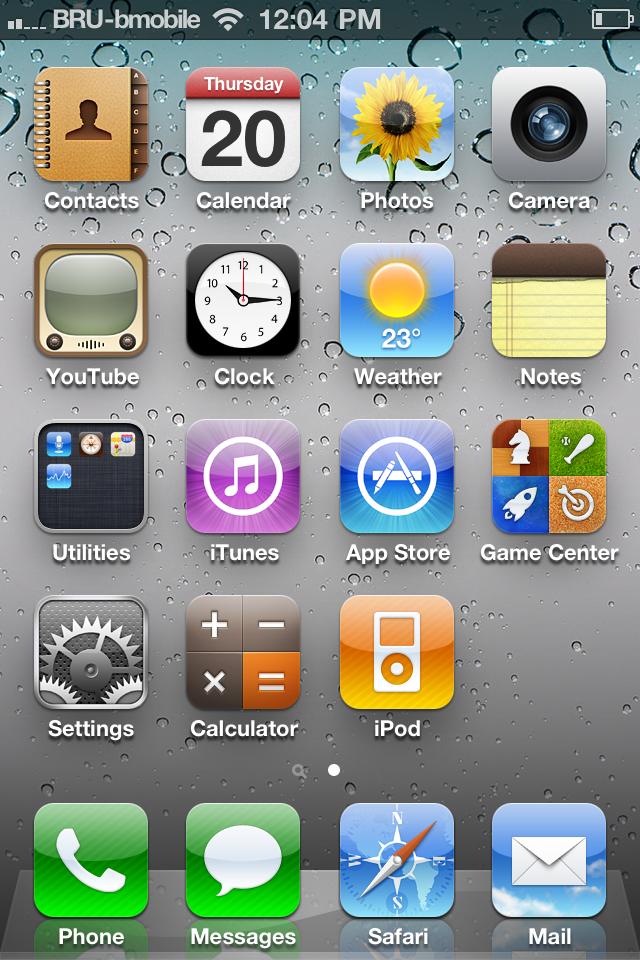
iphone wifi not working
 wifi weak signal

Action taken:
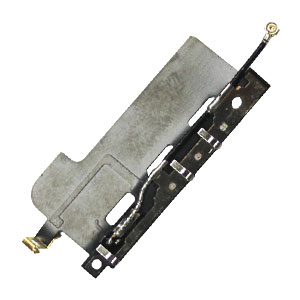
I disassemble the unit. Opened the back-cover and replace the problematic Wifi. I notice that the wire  antenna is a damaged.
iphone wifi not working
iPhone  Antenna

The signal goes two bars when the iphone is taken away from the router the signal goes down to zero signal.

Inspecting the upper part of the iPhone I found out that there is hole with no screw, Maybe the technician forgot to screw it.


I look for the same screw in my toolbox and replace the missing screw.
After that the iPhone problem is gone.


Problem solved


If you have an iPhone not in good condition check also for missing screws. Who knows it is just a lost screw problem.

This solution is from maui_1856 of tapgsm.com.ph

Minggu, 12 Desember 2010

Cydia patch on IOS 4.2.1 Tutorial using MAC.

Here are the step by step tutorial on how to patch cydia on IOS 4.2.1.

STEP 1: First of all, you need a jailbroken device running iOS 4.2.1, so you can use our posted here to jailbreak iOS 4.2.1 on iOS devices using Redsnow 0.9.6 b2.

STEP 2: Download Cydia.patch file for iOS 4.2.1  and copy it to /Applications/Cydia.app/Cydia_ by SSH’ing into your iOS device.


STEP 3: Now type the following commands in terminal app on Mac OS X by using the original Cydia binary.
apt-get update

mv Cydia_ Cydia.bak
bspatch Cydia.bak Cydia_ Cydia.patch

chmod +x+s /Applications/Cydia.app/Cydia_
STEP 4: Finally, reboot your device and enjoy Cydia on your device.


If you rely on unlock, it's recommended you stay away from Redsn0w as you will lose your unlock on your iOS device. From now on, you will need to boot using Redsn0w whenever your device is rebooted until comex make iOS 4.2.x jailbreak untethered. So, whenever you want to SSH into your device, you must first run your device in the “jailbroken state” on every reboot by using “Just boot tethered right now” option in Redsn0w.

 You may like:  best-cydia-jailbreak-apps-tweaks-ios4

Minggu, 28 November 2010

5 Critical Warnings for iPhone Jailbreak


If you jailbreak your iPhone and allows you to control most things that are not allowed cell before, after jailbreak risks are much greater than its benefits.

If you jailbreak your iPhone and allows you to control most things that are not allowed to cellphone before. The result comes with the jailbreak, such as stability, security, safety, legality and necessity. Security experts have suggested that users jailbreak iPhone (Jailbreak Apple IOS 4,2, 3GS IOS 4.1), because of the risk after jailbreak is much more than its benefits.


iPhone jailbreak warning 1: Stability

Jailbreakreaking the iPhone will probably lead to a reduction of stability and then can affect the performance of key devices. It makes sense that Apple is making great efforts to protect the software and their hardware. The company is committed to providing a stable platform for mobile (iPhone, iPad, iPod) to offer consumers an excellent UE (user experience). For some people, controlling their own Apple products somewhat arbitrary, but Apple has done to achieve these goals.

iPhone jailbreak warning 2: Warranty

Jailbreaking the iPhone is probably the loss of the security services. Although the U.S. Copyright Office, whereas jailbreak the iPhone (iPhone jailbreak 4) is legitimate, it does not mean that Apple will support it. Of course, Apple can not sue in tort or send crackers in prison, but users of the iPhone jailbreak must take the risks themselves.

iPhone jailbreak warning 3: Safety

By limiting the multi-tasking, monitoring the application store, Apple offers a good protection for users of iPhone. For iPhone jailbreak, this protection will no longer exist. iPhone users will be able to get low quality or malicious applications (such as fake birds Angry) on the black market, which may be quietly running in the background, threatening the security of user data.

iPhone jailbreak warning 4: legitimacy

Although the United States Copyright Office and the "Digital Millennium Copyright Act» both felt that the iPhone jailbreak is legal does not mean that Apple will not use other legal matters. For example, the jailbreak is legal, but spreads the tools specifically for the jailbreak is illegal.

iPhone jailbreak warning 5: necessity

There is no need to jailbreak iPhone, Apple's application store has more than 20 million applications, unless you want to prove your ability to crack, or you like some practices that Apple did. If you only want to use the network of Wi-Fi, it is necessary to take the breach of warranty, to reduce the stability and security, and even take on the iPhone crash risks?

You may like:   Jailbreak with redsnow

Kamis, 25 November 2010

BlackSn0w best apps on iphone to unlock or Jailbreak iPod Touch, iPhone 3G/3Gs iOS 3.1.2.

If your iPhone is 3.1.2 with baseband 05.11,07 and you want to unlock your iPhone while you are using iPhone using PwnageTool, you must read this tutorial! Now you can download BlackSnow from Cydia and unlock your iPhone, just following this steps:

1. add the following repo in Cydia: blackra1n.com
2. Then in Cydia, find the BlackSn0w.
3. Launch BlacSn0w and install it.
4. Wait until installation process done, and your iPhone will reboot.
5. Done!


Congrats, look for BlackSn0w. Install the application and reboot your iPhone.
And now your iPhone is unlock!

You may like: Best apps on iphone to JailBreak and Unlock iPhone 3G, iPhone 3G and four 4.1/4.2


iPhone iOS 4.2.1 GM Jailbreak with Redsnow 0.9.6 b2 on iPhone 4, 3G, 3GS and iPod

Redsnow 0.9.6 b2 which is based on GeoHot’s Limera1n exploit can jailbreak iPhone IOS 4.2.1 GM.


Software  0.9.6 b2 can unlock iPhone  4.2.1, iPhone 3GS, iPhone 3G, iPod Touch 4G, iPod Touch 3G and iPod Touch 2G on  4.2.1. iPad is not yet supported by this unlock but you can use the PwnageTool to jailbreak ios 4.

But there is one problem that Apple has changed some private APIs used by Cydia and due to which Cydia crashes when you try to start it. Cydia for ver  4.2.x is almost ready and the iPhone Dev Team is waiting for the final and public build of ver 4.2.1 before they release it. As you get the full root access after you jailbreak your idevice, so you can also install the hack apps via SSH.

Here is the step by step guide to hack ver 4.2.1 on iPhone and iPod Touch version with Redsn0w:

Step 1: Download ios 4.2.1 GM (links to downloads or download pages are listed at the bottom of this post).

Step 2: Download ver 4.1 final version 

Step 3: Download Redsnow 0.9.6 b2 for use in this tutorial.

Step 4: Using the iTunes 10.1, update/restore your phone to ios 4.2.1 GM downloaded in step 1 .

Step 5: Start the Redsnow hack tool and open the ios 4.1 in it to start the hacking process. (Please make it sure that you selected the ios 4.1 IPSW file in this step).

Redsnow 0.9.6 b2


Step 6: Press the Next button after it identifies the IPSW file successfully.

Redsnow 0.9.6 b2


Step 7: Now check the Install Cydia Option. You can also select any other option if available.

Redsnow 0.9.6 b2


Step 8: Switch off your phone and connect it with the PC before you proceed.

Redsnow 0.9.6 b2


Step 9: Follow the Software on-screen instructions to put the iPhone into DFU mode.

Redsnow 0.9.6 b2


Step 10: Wait a few seconds for program to do its thing. After you receive the DONE message, close Redsn0w and enjoy hacked iPhone ver  4.2.1.


Redsnow 0.9.6 b2

Jailbreak you iPhone  4.2.1 Today


Downloads :
 Direct Download links Firmware:
Note: If you rely on unlock, don’t update you device to iPhone 4.2.1 otherwise you’ll lose carrier unlock and there is no unlock available for iOS 4.1 and above yet.


 Disclaimer: This guide is for testing and educational purpose only. Use it at your own risk. This site will not be responsible for any type of damage.


source:  http://www.shoutpedia.com/jailbreak-ios-4.2.1-with-redsnow-0.9.6-b2-6893/

You may like: BlackSn0w best apps on iphone to unlock or Jailbreak iPod Touch, iPhone 3G/3Gs  3.1.2.

Elimination of Jailbreak iPhone


There are many people who are trying to figure out how to hack the iPhone with the best apps on iphone to unlock it by allowing third-party software to be installed, commonly called "jailbreak" the iPhone. However, what happens to those who want to remove the software from the phone unlocked? there really is not much information about this case on the Internet today. As Apple begins to punish those that run applications Jailbreak in its most recent version of IOS, there will be many more in search of answers in this department.

If you have an unlocked iPhone chances are you love the new functionality it offered. Some of the best apps on iphone hack program have already been added in the latest version of the iPhone software. The funds have iOS4, multitasking, folders and more features that iPhone owners were able to access only by amendment of software running. Now that Apple has these features, they apparently do not want anyone to use Jailbreak software in its products any longer. If you have under iTunes 9.2 or upgrade the IOS software 4 already decided not to use this software when she accepted the EULA (End User Licence Agreement) and there are rumors that now have the ability and are using it to check your iPhone for software non-standard. This can already lead to some accounts canceled iTunes and many think that their will continue to be a problem.

If you want to get out while the getting is good, you can return from the dark side and for most, it is much easier than you think. The software version is installed Jailbreak offers a "Safe Mode" what to do, all you have to do is put the phone in sync mode. When the iPhone was backed up, you have transferred your purchases to iTunes and then with the new IOS version that is ready to go. Be prepared for a few hours of time synchronization, because these backups do take some time. For owners of the iPhone 3G model, which will not have many features that are promised in the software update, so do your homework first to make sure that you know you're getting. It seems AT & T already is pushing some upgrades that are purposely slow down users who requested the software jailbreak. This is just one reason to think about changing your iPhone to your standard software.

No matter what you like about the Jailbreak software, not many people who want to change your iTunes account for some extra applications. After all the iTunes Store features thousands of best apps on iphone to choose from. You can now legally tie even though the AT & T service, so this is another reason that might consider switching back and removing the iPhone jailbreak software from your phone.

Best apps on iphone to JailBreak and Unlock iPhone 3G, iPhone 3G and four 4.1/4.2

Info PR: 3 I: 49,400,000 L: wait... LD: 190,525,685 I: 264,000Rank: 8 Age: Oct 12, 1999 I: 0 whoissourceRobo: yesSitemap: no Rank: 1052 Price: 5521735 Density
Unlocking the iPhone Ltd. has launched an innovative, Jailbreak and unlock an iPhone click solution for all models and versions of Apple's iPhone. These include the iPhone 3G, iPhone 3G and four 4.1/4.2

Jailbreak and Unlock iPhones have become increasingly common among iPhone owners these days. More than anything, people resort to these techniques to break free of restrictions and exclusive features that the mobile phone maker and service provider offers. When it is done carelessly and with the wrong tools, these processes are threatening to destroy the iPhone.

A reliable expert Unlock iPhone, iPhone Unlock Ltd, has created a new tool that can do the jailbreak and unlock iPhone 3G, iPhone 4.1 and iPhone 3Gs 4 4.1 worldwide. By unlocking their iPhones, customers can use a network provider they choose, anywhere.

IPhone Probably most experienced and successful unlocking service in the industry, the iPhone Unlocking Ltd., launched its first program to unlock the iPhone, in July 2007 which was downloaded by one million customers in 145 countries.

On its website, the iPhone Unlocking Ltd. details in your program last release of the iPhone is compatible with all versions of firmware and IOS. This feature ensures that the software is not the result of the discovery of loss of functionality or features, and other positions zero roaming. It also offers free GPS navigation application, and enables video conferencing on 3G iPhone or 3G, as well as Flash applications or Cydia.

"He works very quickly and is very easy to use! Great product," Perry M. Toronto, Canada, talks about iPhoneUnlocking.com s newest software.

Along with its latest software release of the iPhone, introduced a iPhoneUnlocking.com additional debugging functionality not available with any other software solution. This additional feature is the ability to improve performance and overall speed of an iPhone.

In addition, iPhoneUnlocking.com is offering its customers free lifetime updates with every purchase. This can ensure security updates for future versions of the firmware. More importantly, the iPhone will remain unlocked when you install future firmware and IOS versions.

iPhoneUnlocking.com explains that its latest software is designed with absolute simplicity in mind, and offers users a simple 1-2-3 step guide. Using this innovative software, the computer illiterates will have the ability to unlock any iPhone with absolute ease, in less than two minutes.


Unlock you iPhone Today

You may like:  best apps on iphone

Rabu, 17 November 2010

Limera1n iPhone 4 Jailbreak! iOS 4.1! iPhone 3GS 4.1! iPod Touch 3g 4.1! All 4.1 Devices!!!

Selasa, 16 November 2010

Sn0wbreeze 2.1 iOS 4.1 Jailbreak for All iOS Devices Released [How To]

Sn0wbreeze 2.1 iOS 4.1 Jailbreak for All iOS Devices Released [How To]


Posted by alibintahir on November 15, 2010 in Apple, How To [GUIDE], Internet News, Tips & Tricks, iPad, iPhone


Sn0wbreeze 2.1 has been released and available to download for Window users. This version of sn0wbreeze i.e., Sn0wbreeze 2.1 is capable of jailbreaking all iDevices running on iOS 4.1 (iOS 3.2.2 for iPad) and all firmware versions before iOS 4.1. iOS 4.2 is currently not supported. Continue Reading to know more: Following iDevices with firmwares are compatible with this release of Sn0wbreeze:

* iPhone 4 on iOS 4.1
* iPhone 3GS (new and old bootrom) on iOS 4.1
* iPhone 3G
* iPhone 2G on 3.x.x
* iPad on iOS 3.2.2
* Apple TV 2G on iOS 4.1
* iPod Touch 4G/3G/2G on iOS 4.1


Below is the Step-by-step guide on how to Jailbreak your iPhone 4, iPhone 3GS, iPhone 3G running on iOS 4.1:
Jailbreak iPhone 4, iPhone 3GS, iPhone 3G on iOS 4.1

Step 1: Download Sn0wbreeze 2.1, iOS 4.1 ipsw file for your iDevice and iTunes 10.1 from the links given below.

Step 2: After downloaded, Run Sn0wbreeze 2.1. After passing by the warning and the credit screen, you will come to the IPSW selection screen:


Step 3: Click on the ‘Browse’ button and select the iOS 4.1 file for your iPhone which you have just downloaded form the link below:

Step 4: After selection, sn0wbreeze will verify the IPSW file, wait and let sn0wbreeze verify that IPSW file. The click on the arrow to continue:


Step 5: In the next screen, you can choose either the ‘Simple Mode’ or the ‘Expert Mode’ according to your knowledge about this procedure. If you want to choose Custom Boot logo (iPhone 3G only) or want to install SSH on your iPhone, then go to the ‘Expert mode’, otherwise simply select the ‘Simple Mode’ which will accordingly do all the rest of the processing with default settings for you till the building of the custom IPSW file.
Simple Mode:
Step 6: Simply select ‘Simple Mode’ and ‘Click the blue arrow to continue’:


Note: If you’ve selected the ‘Simple Mode’, then simply continue from Step 12 given in the guide below for ‘Expert Mode’

Expert Mode:
Step 6: If you want to select Custom Boot logo and install SSH on your iPhone, then select ‘Expert Mode’ and then ‘Click the blue arrow to continue’:


Step 7: In the next screen, first of all, select ‘General’ and click the blue arrow to continue. You can enable or disable Background Wallpaper, Battery Percentage, Native Multitasking and install SSH from here and iPhone activation is enabled by default

You can also change the default root partition size (850 MB).


Click on the blue arrow to go to the Unlock screen, but unfortunately, Sn0wbreeze 2.1 doesn’t include ultrasn0w unlock. The reason behind this misery is that:

Unfortunately, we were unable to get permission from MuscleNerd to include Ultrasn0w in sn0wbreeze. The reason is, it would be hard to maintain updates. If you really need to install it offline, then go to custom Apps, and refresh the http://repo666.ultrsn0w.com tab. Then select Ultrsn0w.


Step 9: Then click Next to to the Custom Apps screen. Here you can download or add debian packages from your local hard disk to be installed with the custom build firmware, then Click Next.

Step 10: Right now, only iPhone 3G users can select the custom Boot logos and then click Next to browse and select a boot logo for your iPhone 3G.

Step 11: Then select ‘Build IPSW’ and click on the blue arrow to continue:


Step 12: Then after clicking on the blue arrow to continue, wait till the Sn0wbreeze will build custom iOS 4.1 IPSW for you. Once finished, you have to put your device in DFU mode, Sn0wbreeze will help you with that step by step on screen instructions:


Step 13: Once you are in DFU mode, iTunes will detect your device in recovery mode. To install the new firmware, you have to click on the ‘Restore’ button while holding the ‘shift’ button on Windows (‘alt’ button on Mac), then release the ‘shift’ button and select the custom firmware created by Sn0wbreeze and then sit back as iTunes will do the rest for you.

Step 14: All done! Now you have a jailbroken iDevice running iOS 4.1. If you rely on Carrier unlock, then you can unlock it easily on older baseband using the latest version of ultrasn0w, but keep in mind, if you have unfortunately updated the baseband of your device to 05.14.02 (iPhone 3G and iPhone 3GS) or 02.10.04 (iPhone 4), then you have to wait till the new version of ultrasn0w will be released.

Jailbreak your iPhone Today


Downloads:
Sn0wbreeze 2.1 (Windows only)


Direct Download Links for iOS 4.1 (Official from Apple)

iPhone 4

iPhone 3GS

iPhone 3G

iPod Touch 4G

iPod Touch 3G

iPod Touch 2G

Download iOS 3.2.2 for iPad

Download iTunes 10.1 for Windows

Download .NET Framework 3.5 (required to run sn0wbreeze 2.1)

You may like:  iOS 4.2.1 GM Jailbreak with Redsnow 0.9.6 b2 on iPhone 4, 3G, 3GS and iPod

Senin, 15 November 2010

iPhone 4.2 Jailbreak

Jailbreak your iPhone can be a daunting task for the first time you do, so we thought you may appreciate a resource that aims to help make this process a little easier.

The site you should check is helpmejailbreak.com when he received instructions for the iPhone, iPhone 3G, iPhone 3G and iPhone 4, but we imagine that the site will be updated information for the Apple jailbreak TV and Apple iPad.

As for supported versions iOS iOS it supports 3.1.2, 3.1.3, 4.0, 4.0.1, 4.0.2 and 4.1, I am sure that the site will be updated once iOS 4.2 jailbreak was released.

When you visit the site you can select your iPhone version, the version of IOS, your computer OS (Mac or Windows) and if you want to unlock your device, once you answer all these questions are reported in the direction jailbreak methods correct for your particular scenario.

Visit helpmejailbreak.com for yourself, I recommend bookmarking if you are jailbreaking iOS 4.2 when it comes out.

We'd love to hear if this site helped you jailbreak your Apple device, please let us know in the comments below.

Follow us on Twitter and Facebook, or get daily updates by e-mail.

 
Design by Free WordPress Themes | Bloggerized by Lasantha - Premium Blogger Themes | Lady Gaga, Salman Khan