Tampilkan postingan dengan label Interface Builder. Tampilkan semua postingan

Kamis, 19 Agustus 2010

Transparent Grouped Tableviews

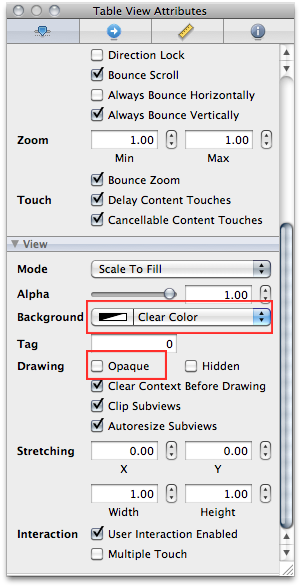
I ran into a problem today with a transparent grouped table view. On the table view, I set opaque to NO and set the background color to clearColor so that an image behind the table would show through:
Screen shot 2010-08-19 at 1.55.43 PM.png
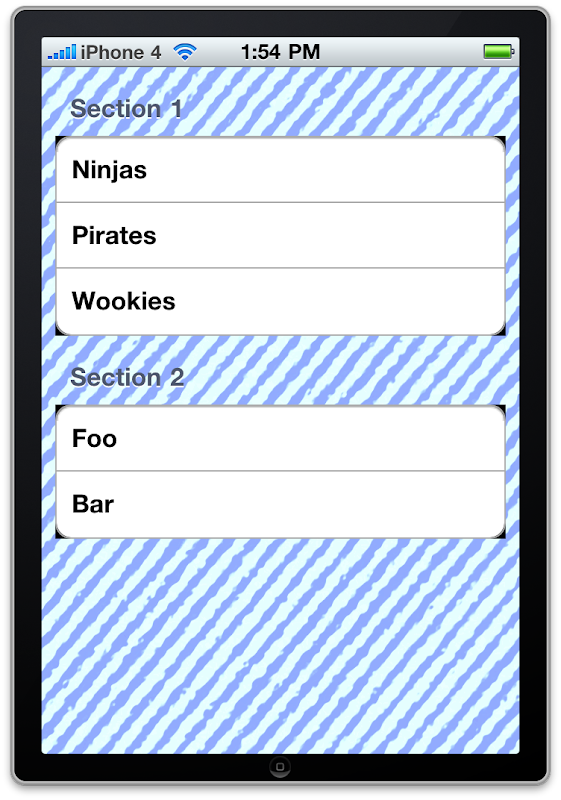
I can't show you the actual app I was working on because I'm under NDA, but I've created a sample project that shows the problem using a really ugly background image. Notice the black around the corners of the group sections:
Screen shot 2010-08-19 at 1.54.21 PM.png

It took me a while to figure out why this was happening, but with a little crowd-source debugging thanks to Twitter, I've narrowed the culprit down. Even though you can clearly see in the first picture that the table view's background color has been set to clearColor in Interface Builder, that setting is either not being respected, or is being changed somewhere. Now, I'm using stock elements here - no custom views at all - so I know I'm not changing it.

My original fix for this was rather involved, but after a process of elimination where I kept commenting out bits of the fix and and seeing what impact it had, I was able to remove all of the code of my fix except for this line of code:

- (void)viewDidLoad
{
[super viewDidLoad];
self.tableView.backgroundColor = [UIColor clearColor];
}


Turns out all the other parts were red herrings leftover from my various attempts to fix the problem. So, if you're having this problem, just manually re-set the table view's background color to clearColor and you should be good.

(and yes, I'm going to file a bug report now)
Kamis, 22 April 2010

Table View Cells Redux

Quite a while ago, I posted about Apple's recommended way of doing custom table view cells in Interface Builder. The code from that post has been available for 9 months and today, for the first time, somebody pointed out to me that the attached project didn't reuse dequeued cells because I forgot to type the cell's identifier in Interface Builder.

Which is the weakness with Apple's recommended approach. It's a real Achille's heel. It's really, really easy to forget that step, and the code works perfectly fine if you do forget, you're just eating memory and getting poorer performance than you should. Unless you profile your apps or test with very large data sets, you could very well ship your app like this and not even realize it. You never want your customers to discover these things before you.

Now, I didn't even know I had made this mistake until today, but I've known it was a potential problem for quite some time, which is why, in my contract work, I've started using a modified version of the technique. My earlier mistake now gives me a good excuse to post that modification.

Mostly, it's the same technique as I discussed before, only I start out by defining a constant for the identifier. I actually create a header file in my Xcode projects ConstantsAndMacros.h in my project, which I add to my pre-compiled header file. This means that any constants and any macros I put in ConstantsAndMacros.h will be available to all my source code files in my project without having to manually import them. For a simple project, that file might look something like this:


#define TABLE_CELL_IDENTIFIER @"Table Cell Identifier"
#define NSStubLog() NSLog(@"%s", __PRETTY_FUNCTION__)¹

Once I have that file, I add it to the .pch file in the Other Sources folder:

#ifdef __OBJC__
#import <Foundation/Foundation.h>
#import <UIKit/UIKit.h>
#import "ConstantsAndMacros.h"
#endif

Now that constant is available project wide². Then, in my UITableViewCell subclass, I override the reuseIdentifier method and add a class method with the same name, like this:

+ (NSString *)reuseIdentifier
{
return (NSString *)TABLE_CELL_IDENTIFIER;
}

- (NSString *)reuseIdentifier
{
return [[self class] reuseIdentifier];
}

By doing this, the system will ignore any identifier I set in Interface Builder, or any value I set in code using the setBundleIdentifier: mutator method. For instances of this particular class, it will always use the same identifier. By creating the class method, I have access to that identifier even if I don't yet have an instance of the class.

For all the other steps in using custom table view cells loaded from a nib, the process is the same as the previous tutorial and it works great. Here's an example tableView:cellForRowAtIndexPath: method using this technique:

- (UITableViewCell *)tableView:(UITableView *)tableView cellForRowAtIndexPath:(NSIndexPath *)indexPath 
{
TestCell *cell = (TestCell *)[tableView dequeueReusableCellWithIdentifier:[TestCell reuseIdentifier]];
if (cell == nil)
{
NSLog(@"Loading new cell");
[[NSBundle mainBundle] loadNibNamed:@"TestCell" owner:self options:nil];
cell = loadCell;
self.loadCell = nil;
}

cell.cellLabel.text = [NSString stringWithFormat:@"Row %d", [indexPath row]];
return cell;
}

Notice the NSLog() statement? I can open my table view cell in Interface Builder and set any identifier I want, or set no identifier at all, and it will still re-use table view cells. Run the app, and no matter what you do in Interface Builder, you'll only see a handful of rows loaded from the nib file. After the initial loads, it will just keep reusing the same cell instances over and over. This is far less fragile than having to make sure the identifier in IB and the one in your code match.

There might be times when you don't want to set it up like this - when you need to have multiple identifiers for the same table view class, but those situations will be exceedingly rare. In most practical situations where you are subclassing UITableViewCell, you will want a single identifier for all instances of that class. What you normally won't want is the fragility of having to make sure the value in your code matches the one in IB exactly, especially given that there are no obvious signs that you've forgotten to do it.


1 This macro just logs the name of the method of function that it's placed in when that method is called. I use it whenever I stub out an IBAction method to make sure my connections are all made correctly, hence the name, but it's useful for debugging as well.

2 If you will only use a table view cell in a single controller, you probably don't want it here. In general, I try to create table view cells to be generic enough to be used in more than one controller. Sometimes that's not possible or practical, and in those cases, #define your identifier in the table view controller header instead.

You can find a sample implementation project right here/

Kamis, 15 Oktober 2009

Don't Fear the Interface Builder Redux

Last week, when I advised readers not to fear Interface Builder, I left out one very important piece of information. I am far from the only one who says that using Interface Builder isn't really optional. Apple's documentation says exactly the same thing, in no uncertain terms. The relevant portion is as follows:
Note: Although you can create an Objective-C application without using nib files, doing so is very rare and not recommended. Depending on your application, avoiding the use of nib files can involve overriding large amounts of framework behavior to achieve the same results you would get using a nib file.
I don't think Apple could be much clearer on this point. Apple and NeXT developers have been using Interface Builder for twenty-one years, longer than many programmers have been programming. I think, at this point, they've got a pretty good handle on how it works and when it should be used. It boggles my mind that there's even a debate on this issue. There's really no excuse for creating your user interface in code in the vast majority of situations. Using Interface Builder is faster and much easier to maintain.

Don't fight the design, work with it.

Thanks to Saurabh Garg for pointing this out.

Kamis, 01 Oktober 2009

Don't Fear the Interface Builder

The question of whether to use Interface Builder is not one most experienced Cocoa developers that I've talked to struggle with. Basically, they use Interface Builder unless they have a good reason not to. And reasons not to are relatively rare.

In the days before the iPhone, Apple's Cocoa Dev Mailing List would once in a while get a question from somebody new to Objective-C and Cocoa who wanted to create their GUIs programmatically. Here's a response to one of those questions from knowledgeable Cocoa/NeXTSTEP programmer and frequent Cocoa-Dev contributor John C. Randolph way back in 2001 that pretty much nails it:
This question comes up fairly often, and the answer is yes, it can all be done in code (which, after all is what -loadNibFile: is doing), but there's no more reason to abandon IB than there is to forego compilers and write all your code with a hex editor.
Yep. I couldn't think of a better way to say it, which is why I've quoted John's eight-year old response.

With the popularity of the iPhone, we've seen an upsurge in the number of people wanting to create their interfaces programmatically again. There are a number of factors contributing to this. First and foremost is that we've got a lot of people from different backgrounds, including people who have worked with languages and tools with GUI builders that use different, more problematic approaches or who have simply never worked with building GUI applications in a compiled language at all. Another reasons is that Interface Builder wasn't initially available for the iPhone, so a lot of applications and even a fair amount of early Apple sample code was written without it, so newcomers get a false sense that Interface Builder is just optional: purely personal preference.

Prompted by a comment in a recent blog posting, I've decided to try and explain in more detail why you shouldn't avoid Interface Builder. Most of this information is recycled from my iPhone Boot Camp Workshop material.

If your gut is telling you to avoid Interface Buidler, for whatever reason, your gut is wrong. This isn't one of those cases where there's more than one right way and it's purely a matter of personal preference. Interface Builder is clearly the preferred way and with very good reason: it makes your applications faster to create and easier to maintain. But there's even more to it than that.


The name of Interface Builder is actually a little misleading. It’s much more powerful than the name implies and it’s important to understand why.

Interface Builder does not generate code. It doesn’t create a forms file of any sort. What it does, is actually instantiate and configure the same objects that you use in your application to show your user interface. If you add a button to your application in Interface Builder, you’re actually creating an instance of UIButton or NSButton. When you configure it, you’re actually setting state on that button instance. Then, when the nib file gets saved, that button gets serialized into the nib file using NSCoding, exactly the way we persisted objects the archiving section of the persistence chapter in Beginning iPhone 3 Development. Basically, the nib loader is doing exactly what the code you would write to create and configure the interface object would do, down to the actual method calls used.

Why is this better than code generation or a form file? Well, in addition to letting you leverage extraordinarily well tested code to build your user interface, it also means that you are not limited to having just user interface elements in your nibs. You can put instances of any objects that conform to NSCoding, which is the protocol that allows objects to be serialized and de-serialized. Any object at all. In the iPhone Xcode project templates, this is how your application delegate and your root view controller get created.

There is a design philosophy at work here. It's simple and important. This design philosophy goes like this:

Any line of code you don't have to write, is a line of code you don't have to maintain and is a line of code that you can't introduce a bug into.
Simple, but elegant. And valuable.

If you’re writing tons of code to implement your user interface, that’s lots of code you have to write, maintain, and debug. The nib loading code is solid. It’s been around darn near 20 years and is used in literally thousands of production applications, including most of Apple’s applications. Apple very much "eats their own dogfood" when it comes to their development tools. If you look inside the bundles of an Apple application, the chances are very high that you will find some nib files in there.

I know some of you will still want to resist Interface Builder. Don’t. Seriously. You’re wasting your time. You are being inefficient if you are creating your user interface directly in code when there’s not a compelling reason to. There are times when the programmatic route is the right choice. There are times when it makes sense to programmatically create your user interface. In reality, though, those times are very few and very far between.

Yes, there is a learning curve, especially with debugging. But stick with it. It won't be long before you recognize the signs of a disconnected outlet or other IB-related problems and in the long run, the gains will more than justify the time investment.

 
Design by Free WordPress Themes | Bloggerized by Lasantha - Premium Blogger Themes | Lady Gaga, Salman Khan