Tampilkan postingan dengan label Ad Hoc Distribution. Tampilkan semua postingan

Rabu, 25 Agustus 2010

Beta Builder

A week or two ago, Jeffrey Sambells had a blog post about using Xcode's Enterprise distribution for ad hoc distribution. It's a great idea that a lot of developers saw had great potential, but it had several manual steps.

Since that post, Hunter Hillegas of Hanchor, LLC and developer of Vegas Mate, has created an application to automate the entire process. The app is called Beta Builder, and it's free. If you do much ad hoc distribution, you should check it out.

Sabtu, 01 Mei 2010

Xcode 3.2: Build and Archive

One aspect of iPhone development that I'm no big fan of is ad hoc distribution. In Xcode 3.2, Apple added a new feature to Xcode that makes ad hoc distribution more than a fair bit better. But, for the first few weeks of using Xcode 3.2, I didn't even notice this item. I know many of you probably have, but I've talked to enough people that also missed it, that I figured it's worth a short post.

This new item lives under the Build menu, but frankly, I don't use menus much in Xcode. I use a very custom set of key bindings and have all my regular tasks' key commands memorized. The new option is called Build and Archive.

I still wish Apple would get rid of the whole process, but it's unlikely they will in the near future. In light of the situation, this makes life much, much better. It's a pretty good compromise between Apple's desires and the needs of developers, all in all.

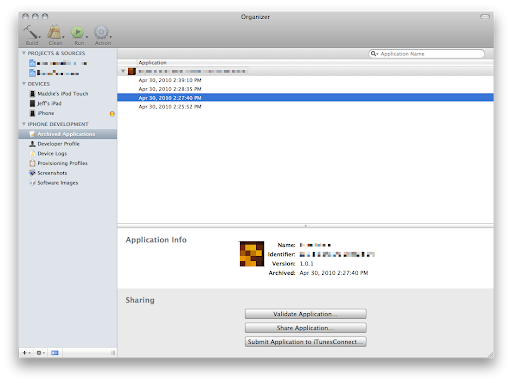
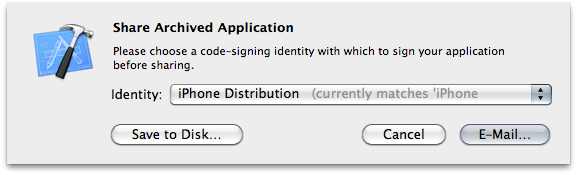
Build and Archive builds your application, code signs it, and stores the application folder along with its symbols file (which you need to decode crash logs generated by ad hoc or release builds). Xcode's Organizer window gives you ready access to any previous build, and lets you e-mail an ad hoc build packaged up as an .ipa file with the mobile provisioning profile you compiled with embedded right into the application. This allows your clients or tester to simply drag the generated .ipa file into iTunes. The organizer will even generate an e-mail with the .iap embedded in it.

Screen shot 2010-05-01 at 9.43.08 AM.png


Screen shot 2010-05-01 at 9.45.42 AM.png


As part of Build and Archive, Xcode checks your application to make sure it's code signed and provisioned properly. It may also (depending on your project settings) automatically run the new Validate feature that checks to make sure your application is valid for app store submission. This is the same check that the app review team will run on your app before actually looking at it. The details of what Validate checks are not documented, but in general terms, it will make sure everything is okay and that you haven't used anything you shouldn't have used. It's not a guarantee that your app won't get rejected because there's still the manual review for content and HIG, but if your app passes validation, that's one less possible obstacle between you and the app store. In other words, make sure you validate your apps before submitting them.

One thing to note, however, is that when you use Validate for ad hoc builds instead of building for submission to the app store (and I recommend that you do so that you find problems before testing rather than after), your app may fail one of the Validate checks. If you get this warning message when using either Build and Archive or Build and Validate with an ad hoc build:
warning: Application failed codesign verification. The signature was invalid, or it was not signed with an Apple submission certificate. (-19011)
You might be fine (assuming you received no other warnings or errors). The difficult thing is that this warning can be generated by more than one specific problem, so there's no way to know for sure whether this needs to be addressed other than to try and install the generated .ipa file on a non-development phone. You may (will?) get this warning with ad hoc builds even if the build is fine because you don't use an "Apple submission certificate" for ad hoc builds.

One of the best things you can do is to have a second iPhone or iPod touch that's not used for development (ever) that you can use to test ad hoc distributions. Even a second-hand, cheap iPod touch is sufficient since all you're testing is that the install works If you do this, make sure you add the UDID of this unit to your ad hoc distribution profiles, but not to your development profile.

When you see this warning with Validate when building using an Ad Hoc Distribution configuration, don't panic, but do try and install it on a machine that doesn't have your development profile installed before sending it to a tester or client.

Jumat, 02 April 2010

Ad Hoc Distribution, Android vs. iPhone

I've spent a fair few words on this blog discussing my perception of the Android SDK. To sum it all up simply, my overall opinion is that programming for the Android SDK is good, but nowhere near as good, nor as fun, as programming for iPhone SDK. Although Android has some places where it shines, there are relatively few where it outshines the iPhone SDK.

There is one, however. One where the experience is worlds better in the Android camp: ad hoc distribution.

When you do contract programming, ad hoc distribution is a big part of your life. A lot of people who hire others to write software aren't programmers themselves, so we have to have a way to get the applications we develop to our client for their review and for testing. On the iPhone, we have to go through this relatively convoluted process where we create an ad hoc distribution certificate then create an ad hoc provisioning profile that ties the application to certain, specific devices based on a unique identifier called a UDID. The client then has to install the provisioning profile on their phone, and then install the app.

When it works, it's not too terrible. It's a bit of a pain in the ass, but it's not too awfully time-consuming.

The problem is when it doesn't work. When a client reports that an app won't install, trying to remotely figure out why can be really tedious and time-consuming and the process creates a negative impression of the platform in the eyes of the client. And there are many reasons it can go wrong, and it does go wrong way too often in my experience. If the application bundle gets changed in any way, code signing fails and the app won't launch. If the provisioning profile doesn't get installed properly, installation of the app fails. Often, when the problem is finally fixed, we have no idea what we did that fixed it.

And we developers are left holding the bag. We're left spending hours and sometimes even days trying to get the app working on the client's device. Usually, that time we spend figuring out what the hell is going on is unbillable. When a client isn't a programmer, especially when a client isn't particularly tech-savvy, the whole process can be extraordinarily painful and frustrating both for us and for our clients. On top of that, we're limited to 100 devices that we can even do this process with. With several models of iPhone and iPod Touch, plus the iPad and the fact that most developers have multiple clients in the course of a year, we have the added hassle of having to manage our devices so we don't exceed our limit.

On Android? I drop the compiled app into my Dropbox folder and e-mail the client the URL to it. I instruct them to tap the link from their phone. That's it. It just works. No hassles, no worries. There's a one-time instruction I have to give them that involves tapping a checkbox in their phone's settings to allow third-party apps, but after that, it's just the URL. The user still has control of whether it gets installed, so it's relatively safe, but there's no provisioning profile, no iTunes requirement, no worries about the application getting corrupted or accidentally changed in transit. No angry customer calls or e-mails.

In most ways, I wish Android was more like the iPhone. In this way, I really, really wish the iPhone was more like Android. This whole process lacks the polish and ease of use that I ordinarily associate with Apple products, and after two years of developer complaints, it has improved a bit, but not nearly enough.

 
Design by Free WordPress Themes | Bloggerized by Lasantha - Premium Blogger Themes | Lady Gaga, Salman Khan